


This guide is for a tournament with 8 teams. First the teams play in two pools of four. Then the first and second places play for places 1–4, and the third and fourth places play for places 5–8. Every team plays five matches.
What we are building
This guide uses a format that is very common in youth football. The worked example is an U14 tournament with 8 teams:
- the group stage has two pools of four teams;
- the first and second places of both pools go into the Cup bracket — two semi-finals, a final and a 3rd place match;
- the third and fourth places of both pools go into the Plate bracket — two semi-finals and matches for 5th and 7th place.
A stage is a part of the tournament: the pools, or a knockout bracket. This format has three of them.
Every team therefore plays the same number of matches, and all eight places are decided. You do not have to build this bracket by hand: the tournament builder has a template that generates the whole thing.
The main bracket plays for places 1–4, the second one for places 5–8. The app gives them working names, but you can rename them to whatever your competition calls them — Cup and Plate, or anything else.
Before you start
- You are the organizer of the tournament, or you have edit rights on it.
- All 8 teams are already added to the tournament. The builder reads the participant count from this list and pre-fills the form for you.
- The tournament has no stages yet. The template generator only runs on an empty structure — see Troubleshooting if you have already experimented.
You do not need to create the group stage in advance. In one action the template creates the pools, both brackets, and the way teams are distributed into the matches.
Step-by-step
-
Open the tournament, tap the ⋮ menu in the top right corner and choose Tournament Builder.
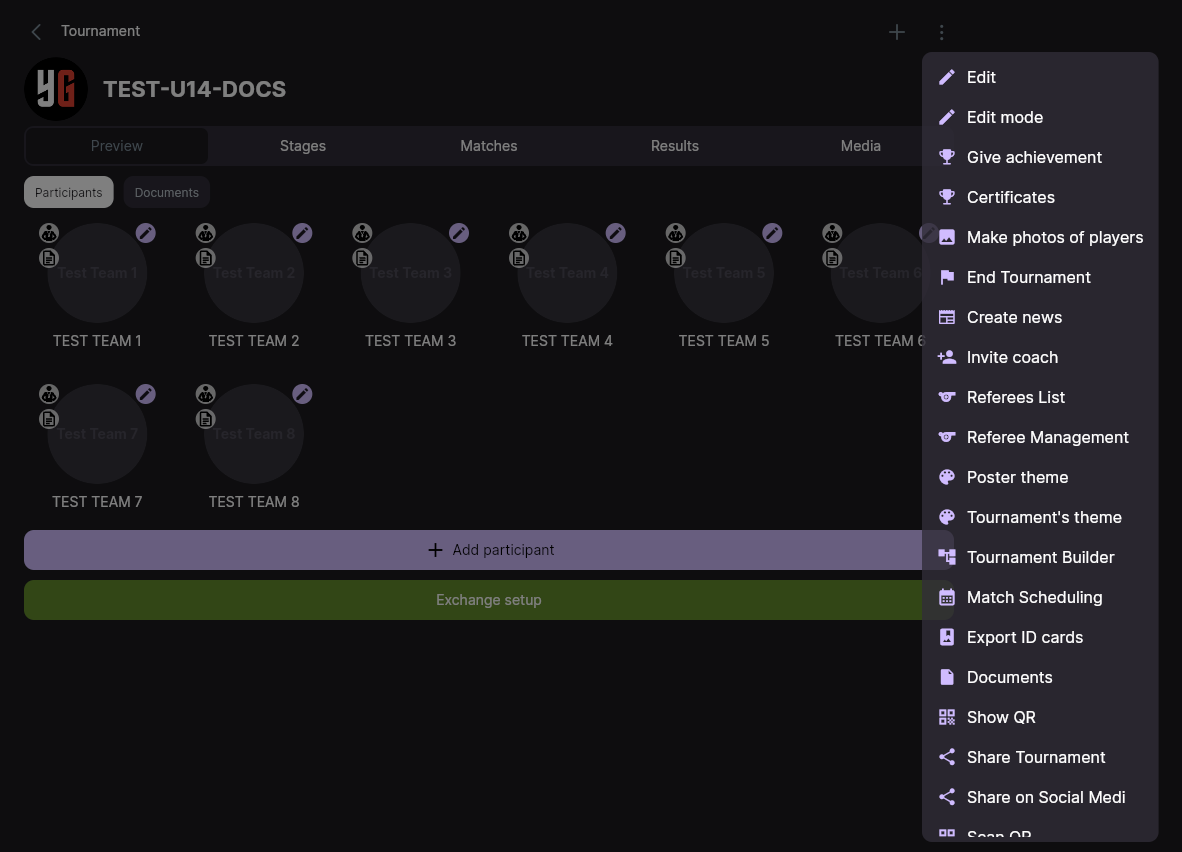 Screenshot: the ⋮ menu of a tournament with the Tournament Builder item
The builder is opened from the tournament’s ⋮ menu. -
The Tournament structure screen opens. For a tournament that has no stages yet it starts on the Standard structure panel on the left, with a live preview of the structure on the right.
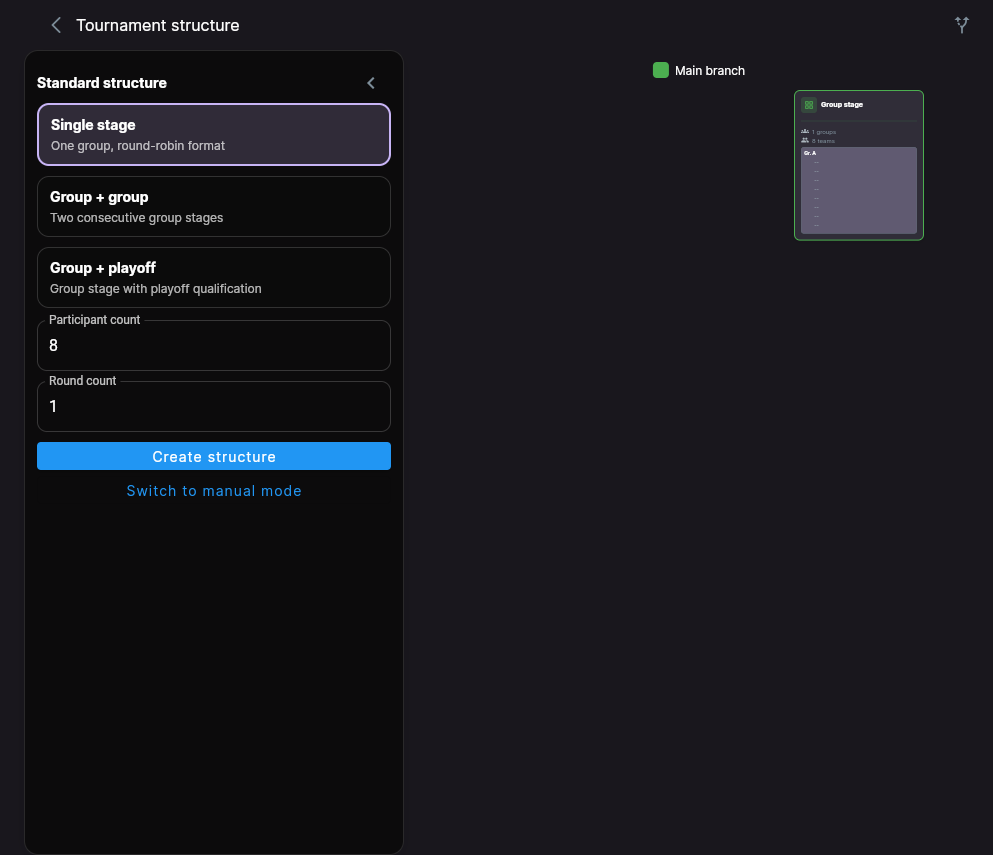 Screenshot: the Tournament structure screen, the Standard structure panel on the left and the preview on the right
The left panel configures the format; the right side previews it live. -
Select the Group + playoff template card (its subtitle reads “Group stage with playoff qualification”).
-
Fill in the fields below the template cards:
- Participant count — 8. Usually already filled in from your team list; correct it if it does not match.
- Groups in stage 1 — 2. These are your two pools of four.
- The round dropdown — 1/2 final. This says how many teams enter the main bracket: a semi-final round means 4 teams, i.e. two semi-final matches.
- Consolation finals — turn this switch on. This is what creates the Plate bracket for the four teams that do not make the Cup.
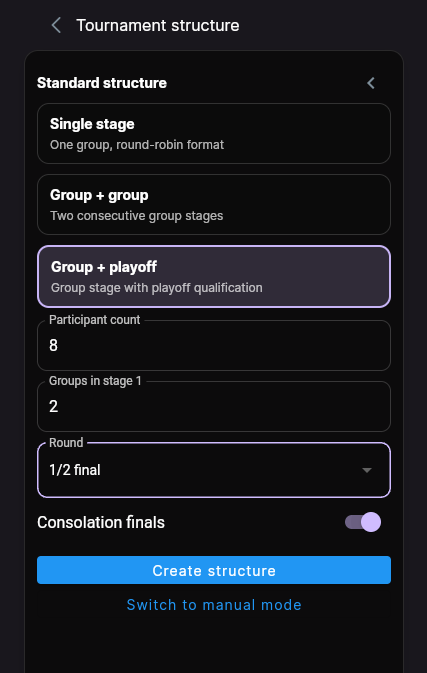 Screenshot: the panel filled in — 8 participants, 2 groups, 1/2 final, Consolation finals switched on
The four settings that define the whole format. -
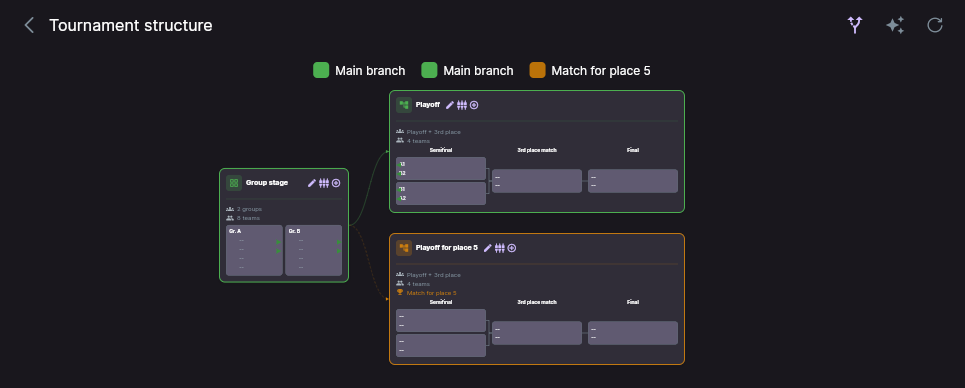
Check the preview on the right. You should see three blocks: the group stage, the main playoff and a second playoff bracket below it. If the preview looks right, tap Create structure.
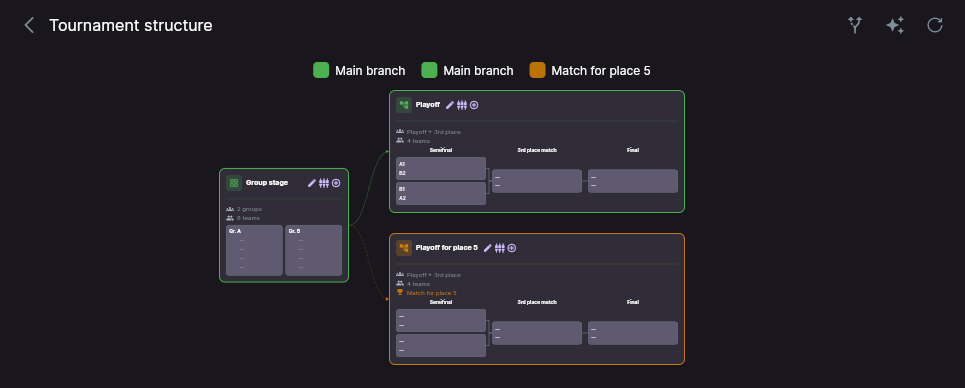 Screenshot: the generated structure — group stage on the left, the main and consolation brackets on the right
The finished structure. The colour of each bracket marks which places it plays for.
What gets created
One tap produces three stages and the links between them:
- Stage 1 — Group stage. Two pools, four teams each.
- Stage 2 — the main playoff, named Playoff. Two semi-finals, a final and a 3rd place match. Fed by the 1st and 2nd placed team of each pool. This is your Cup.
- Stage 3 — the consolation playoff, named Playoff for place 5. Built the same way — two semi-finals and two deciding matches — but played by the teams that finished 3rd and 4th in their pools. This is your Plate: it decides 5th and 7th place.
Once the group stage is finished, the app distributes the teams into the right semi-finals by itself — you never have to assign who plays whom. Once a semi-final is played, the winner goes to the final and the loser to the third place match.
The stage itself is named correctly — “Playoff for place 5” — but the matches inside it use the generic captions Final and 3rd place match. They actually decide 5th and 7th place. The bracket is built correctly, this is only about the captions, and renaming the stage will not change them — the match captions stay as they are. In the schedule, go by the stage name and the final placing: everything played inside “Playoff for place 5” is for places 5 to 8.
Check after creating
Check the semi-final pairings
Tap the fork icon in the top bar — the diagram will show which group place leads to which match.
With two pools, the correct pairings look like this:
- A1 → B2 — the winner of pool A plays the runner-up of pool B;
- B1 → A2 — the winner of pool B plays the runner-up of pool A.
That way two teams from the same pool do not meet again in the semi-final straight after the group stage. If the pairings came out differently, open the connecting line and pick the other semi-final.
Check that the names make sense to participants
The app gives the stages working names — Playoff and Playoff for place 5. If your competition calls them something else, open each stage and rename it. The name appears everywhere the stage is shown — schedule, brackets, posters and diplomas — so it decides whether participants understand which places are at stake.
Other tournament sizes
The same template covers other entry sizes. Set the participant count and the number of pools to match your event, then pick the round that decides how many teams enter the main bracket:
| Teams | Pools | Round | Main bracket (Cup) | Consolation bracket (Plate) |
|---|---|---|---|---|
| 8 | 2 | 1/2 final | 4 teams — places 1–4 | 4 teams — places 5–8 |
| 12 | 3 | 1/4 final | 8 teams — places 1–8 | 4 teams — places 9–12 |
| 16 | 4 | 1/4 final | 8 teams — places 1–8 | 8 teams — places 9–16 |
| 16 | 4 | 1/8 final | 16 teams — all places | — |
The rule is simple: first decide how many teams will compete for the main trophy — that is what sets the round in the list. Everybody else plays a separate stage for the places below it. If a lot of teams are left over, the app adds another bracket so that everyone plays.
The consolation part only becomes a knockout bracket when it holds 4, 8, 16… teams. If a different number is left over — three teams, for example — the app creates a small group instead, and those places are decided in a mini round-robin.
Troubleshooting
“Generation unavailable”
The message “The standard generator works only for an empty tournament structure” means the tournament already has stages. This happens most often after an earlier attempt. Delete the existing stages and run the template again — delete child stages before their parent, because the app blocks removing a stage that others still point to.
The round I need is not in the dropdown
The list only offers rounds that fit the participant count. A 1/4 final needs at least 8 teams, a 1/8 final at least 16. Check the Participant count field first.
I need a format the template does not cover
Use this mode only if your format does not fit any of the templates.
Switch to Switch to manual mode at the bottom of the panel. There you add stages one at a time with the + button and set the format, the number of teams, the starting round, whether the bracket has a bronze match and which place it plays for. You can return to the template at any time with the sparkle icon in the top bar.
Still stuck? Write to support@nsgsoft.me and describe the format you need — we will help you set it up.