

How Video Tagging Works
Tag events directly while watching
FUTBOLISTA allows players and parents to tag game events right on the video timeline — while watching the live broadcast or recording. This turns video into a structured match history where key moments are found in seconds.
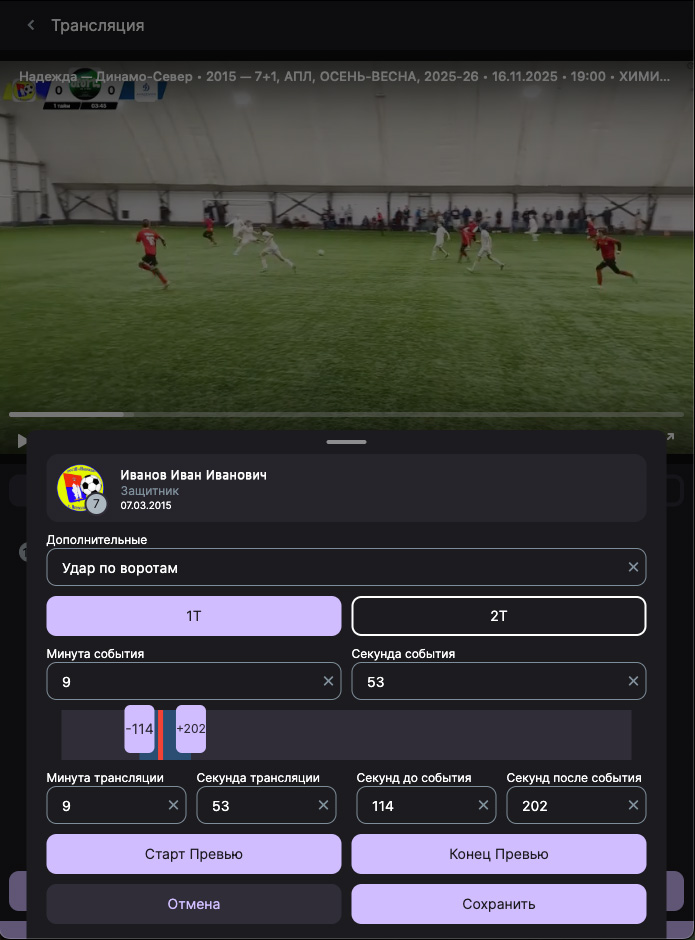
The user marks an event while watching — it gets linked to the video timestamp and saved in the system.
How It Works Step-by-Step
- your player
- event type (pass, dribble, corner, save, feint, etc.)
- video timestamp
- selected player
- event type
What You Get After Tagging
Quick Jumps to Events
You can open the event list and jump straight to the needed moments, without rewinding the whole match.
All Player Events in One Place
Events go into player history and are collected into a single stream by matches/tournaments.
Filtering and Collections
You can filter events:
- by player
- by event type
- by match/tournament
- by time period
And create collections of moments.
What It's Used For
Important
Tagging helps obtain an additional layer of statistics that is usually unavailable without professional operators/scouts/analysts.
Try Tagging in FUTBOLISTA
- 📱 Download the app
- 🎥 Open a match and tag the first event
- 📌 View player event history